Product updates
We work hard on improving Rentman every day. Find out what's new in our latest updates.
All
Inventory
Equipment Tracking
Crew
Quoting & Invoicing

Version F78 / B85
- We improved the flow of lost items. You can now see a list of all lost items.
- We are now able restore backups faster and you can have a preview of the database you want restored.
- You’re now able to style and/or hide individual lines in summation module in document templates.
- Fixed: In the dashboard the right amount of open invoices is shown.
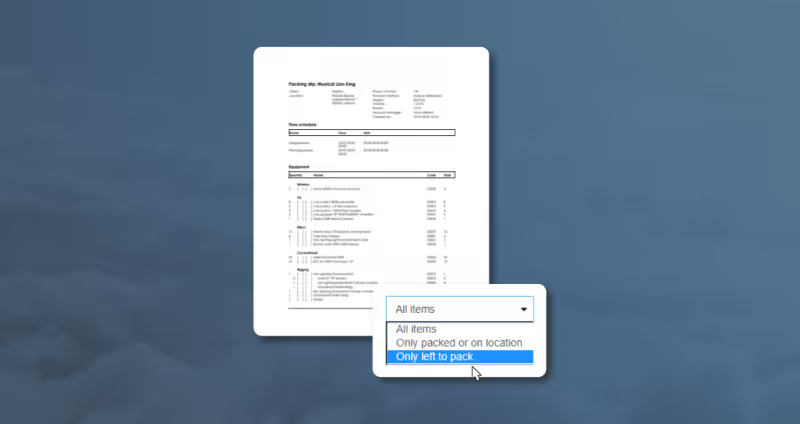
Create packing slip of items that still need to be packed
Our new functionality allows you to create packing slips that only show the items that you still need to pack. Use this functionality when moving equipment from one job to another, when you have a job with two building days or just to get an overview over what still needs to be packed.
Version F76 / B83
- We added the option to create a packing slip with the items that still have to be packed. This will exclude the part that already has been packed or on location.
- On financial documents you can hide crew and transport functions when they don’t have a price.
- The suppliers in the subhire module on documents are now sorted alphabetically.
- When adding an empty comment line it is shown on documents.
Version F74 / B81
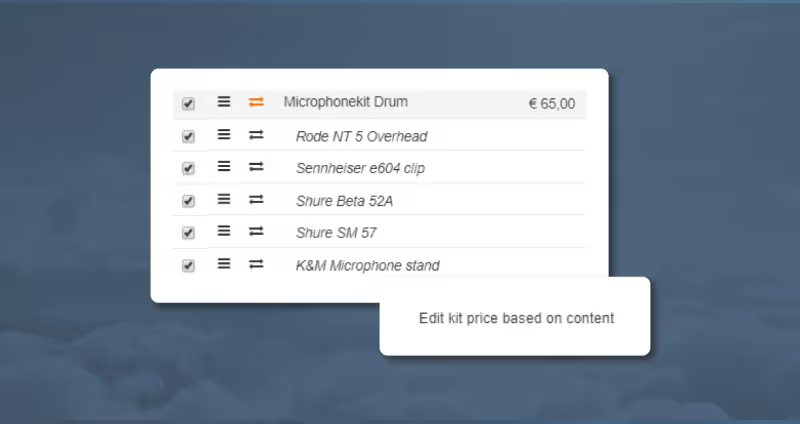
- Calculate the price of a kit based on its content.
- You can now group your invoices on payment date in the invoice module.
- After opening and closing of a project, you are directed to the module that you opened the project from.
- When you’re creating a payment reminder, the letterhead of the invoice is automatically taken over.
Version F71 / B78
- We categorized the fields that appear in drop-down lists to make it easier to select the right field.
- When clicking everything on location in the warehouse module you get an extra warning before the equipment is moved.
- When pressing the button “Everything brought back” in the warehouse module, sales items are automatically left on location.
- We fixed an issue regarding uploading images to crew members.
- Shortages are marked red again after you changed the amounts of items in a project.